
Scratch Coding Classes Singapore: A Complete Parent Guide
Choosing a first coding class can feel confusing because children learn technology in very different ways. Some enjoy games and animation immediately, while others prefer building something physical before they become interested in the code behind it. A good Scratch programme should therefore do more than teach children where to find blocks on a screen. It should help them understand how instructions, logic, design, experimentation, and problem-solving work together.
Meta Robotics uses Scratch as part of a wider robotics and coding pathway for children in Singapore. Younger learners begin with age-appropriate visual coding, while older students progress into MIT Scratch 3.0, robotics projects, games and animation, machine learning, and more advanced technology work. This means Scratch is treated as a foundation rather than an isolated end point.
For parents, that progression matters. A child who learns only how to copy a completed Scratch game may enjoy the lesson but gain limited understanding. A child who learns to plan a project, choose the correct blocks, test an idea, fix mistakes, and explain the final result is developing skills that transfer more easily into later coding and robotics.
This guide explains what Scratch coding is, which ages benefit most, what Meta Robotics teaches at different stages, and how parents can judge whether a coding programme is building genuine understanding.
What Is a Scratch Coding Programme?
A Scratch coding programme teaches children programming concepts through visual blocks rather than typed commands. Instead of writing complex syntax, students connect blocks that represent actions, events, loops, conditions, movement, sound, and other instructions.
The visual format makes programming easier to understand because children can see the structure of a programme. They can move a character, trigger an animation, create a score, or make an object respond to an event without first learning punctuation and exact command spelling.
At Meta Robotics, Scratch is integrated into a broader programme rather than taught only as screen-based coding. Children may use coding alongside robotics, STEM concepts, game design, animation, and physical building. The academy’s programme materials list MIT Scratch Junior for younger students and MIT Scratch 3.0 in programmes for older children, alongside robotics platforms and hands-on projects.
This combination helps children connect what they see on screen with how technology behaves in the physical world.
Why Is Scratch a Good Starting Point for Children?
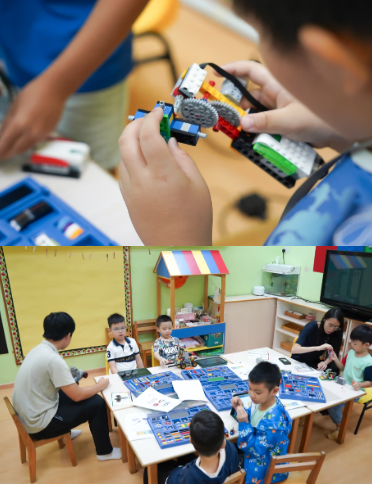
Scratch reduces one of the biggest barriers for beginners: syntax. A child can understand that a character should move ten steps, repeat an action, wait for an event, or change direction without worrying about whether a command has been typed perfectly.
That leaves more attention available for reasoning. Children can ask what should happen first, what needs to repeat, what changes when a condition is met, and why the programme did not behave as expected.
These are early computational-thinking skills. They matter because programming is not mainly about memorising commands. It is about dividing a larger problem into smaller parts, creating a logical sequence, testing the result, and refining the solution.
Meta Robotics describes its learning approach as hands-on and problem-based. Students build, test, evaluate, and work through progressively more difficult challenges rather than simply completing a fixed model and moving on.
For younger children, this makes coding feel more concrete. For older children, it builds the habits needed before moving into more complex programming or robotics tasks.
What Age Should a Child Start Scratch Coding?
The right starting age depends on the child’s reading ability, concentration, confidence with digital devices, and interest in making things.
Meta Robotics structures coding by developmental stage rather than putting every beginner into the same class. Its programmes move from early visual coding and hands-on STEM into MIT Scratch 3.0, robotics coding, games, animation, and eventually more advanced technology.
Ages 5 to 6: Ranker Programme
For children aged 5 to 6, Meta Robotics’ Ranker Programme introduces robotics, coding, STEM, games, and animation at a foundational level. Its listed software includes LEGO Education tools and MIT Scratch Junior.
At this age, the objective is not to master complicated programming concepts. Children benefit more from learning that instructions happen in sequence and that changing an instruction changes the result.
They may begin recognising cause and effect, simple patterns, directional movement, and basic problem-solving. Physical construction also supports fine motor coordination and visual-spatial awareness, while coding introduces the idea that a robot or character follows instructions rather than acting randomly.
This stage works best when lessons remain highly visual and interactive. Children should feel that they are creating and experimenting rather than attending a technical lecture.
Ages 7 to 9: High Ranker Programme
Ages 7 to 9 are often an ideal stage for full Scratch because children can usually read instructions independently, manage longer projects, and understand simple logic.
Meta Robotics’ High Ranker Programme uses MIT Scratch 3.0 alongside robotics and coding tools. The programme integrates Robotics STEM, Robotics Coding, and Games and Animation Computing, with learning in science, mathematics, coding, design, logical reasoning, and problem-solving.
At this stage, children can begin using sequences, loops, events, and conditions more deliberately. They can also create interactive projects rather than simple animations.
For example, instead of programming a character to move from left to right, they may begin building a game in which the character responds to keys, gains points, avoids obstacles, or changes behaviour after a condition is met.
The important change is that the child starts thinking about systems. One action can affect another part of the programme, and several pieces of logic may need to work together.
What Does Scratch Teach Beyond Basic Coding?
Scratch projects can strengthen several skills at once because creating a working game or animation involves more than selecting blocks.
Sequencing and Logical Thinking
Every programme has an order. Children need to decide what happens first, what comes next, and which actions depend on another event.
When something happens in the wrong order, they learn that the problem may not be the idea itself but the sequence.
This is useful beyond coding because structured thinking also appears in mathematics, science experiments, writing, and everyday problem-solving.
Loops and Repetition
Loops teach children how to repeat an action without duplicating the same instructions many times.
A character might move repeatedly, an animation may cycle continuously, or a game may keep checking whether a player has touched an object.
This introduces efficiency. Children begin seeing that a short, well-designed solution can replace a long list of repeated instructions.
Conditions and Decision-Making
Conditional logic allows a programme to respond differently depending on what happens.
A game may award points if a player collects an item, stop when time runs out, or change scenes after a goal has been reached.
Children therefore learn that software can make decisions based on defined rules. This idea later appears in virtually every form of programming.
Debugging and Persistence
One of the most useful lessons in Scratch happens when the project does not work.
A child may expect a character to move but find that nothing happens. Instead of being given the answer immediately, a strong lesson encourages the student to inspect the blocks, identify what is missing, test a change, and try again.
Meta Robotics includes logical reasoning, project evaluation, progressive challenges, and problem-solving tasks within its programme structure.
Learning that mistakes can be investigated rather than feared helps children become more patient when dealing with difficult tasks.
How Does Meta Robotics Combine Scratch With Robotics?
Scratch becomes more meaningful when children can see their coding logic affect a physical machine as well as an on-screen character.
Meta Robotics combines visual coding with LEGO Education robotics systems and other hands-on equipment across its programmes. High Ranker students work with tools including LEGO Education WEDO 2.0, SPIKE systems, and MIT Scratch 3.0, while older programmes introduce more advanced robotics and technology.
This means students may first understand a coding principle through a game or animation, then see a related idea used to control movement, sensors, or a robotic mechanism.
The physical element gives coding immediate consequences. If the instructions are wrong, the robot may turn incorrectly, fail to stop, or behave differently from what the student expected.
That creates a natural debugging exercise. Instead of being told that the programme contains an error, children can see the effect and work backwards to understand what caused it.
What Happens After Scratch at Ages 10 to 12?
Scratch should not become a permanent comfort zone. Once children understand visual programming well, they need broader challenges.
Meta Robotics’ Ace Programme is designed for students aged 10 to 12 and combines Robotics STEM, Robotics Coding, Machine Learning, and Games and Animation Computing. MIT Scratch 3.0 remains part of the learning environment, but students also work with robotics systems and machine-learning concepts.
This stage allows children to move from isolated coding concepts into larger projects.
Instead of learning a loop only because it appears in the syllabus, students can use loops as one part of a robot challenge or game. Variables, conditions, events, and logical structures become tools needed to achieve a larger objective.
The programme also introduces more deliberate project evaluation and problem-solving. Students are expected to analyse whether their creation meets the task requirements and tackle challenges of increasing difficulty.
This is an important transition because children begin thinking less like beginners learning individual blocks and more like creators deciding which tools a project needs.
How Can Scratch Support Robotics DSA Preparation?
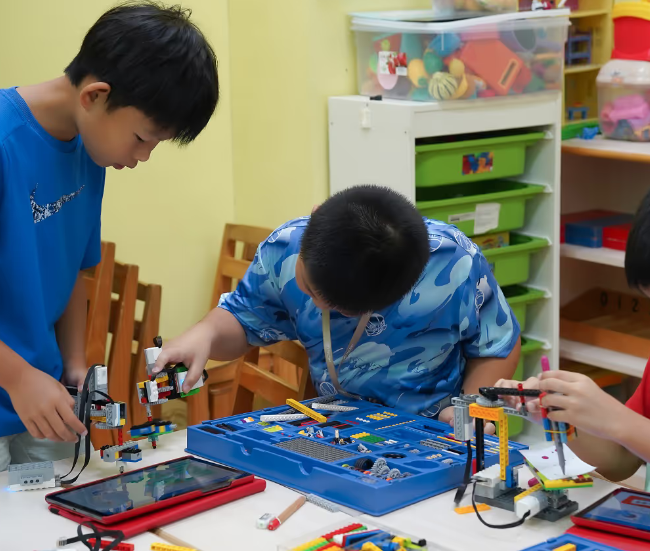
For some upper-primary students, coding and robotics may become more than a recreational interest.
Meta Robotics offers a 45-hour Direct School Admission programme for students aged 9 to 12 that covers robotics, coding, STEM skills, project work, competition preparation, and portfolio development. The programme includes preparation connected with competitions such as FIRST LEGO League.
Scratch-based learning can support this pathway because it helps students develop computational thinking before more complex robotics work.
However, DSA preparation should not be reduced to attending a coding class and collecting certificates. Students need to understand their projects well enough to explain what they built, how the programme works, what problem they encountered, and how they improved the solution.
A strong portfolio reflects genuine participation and development. The child should be able to discuss the work confidently without relying on an instructor to explain it.
For parents considering this pathway, starting before the final application period gives the child more time to build actual experience rather than rushing through several activities at once.
Are Holiday Scratch and Robotics Workshops Useful?
A holiday workshop can be a practical way to test whether a child enjoys coding and robotics before committing to weekly classes.
Meta Robotics currently offers holiday workshops for children aged 5 to 13. The programme runs across three days and includes hands-on STEM, robotics, coding, and project work. Its listed software includes MIT Scratch 3.0 alongside LEGO Education coding platforms.
The workshop format exposes children to several different activities in a short period. This can help parents identify whether the child is more interested in coding, mechanical building, problem-solving, or the combination of all three.
A useful sign after the workshop is whether the child talks about how a project worked rather than simply saying that it was fun.
Curiosity about why something happened usually suggests deeper engagement.
How Should Parents Evaluate a Scratch Coding Class?
Parents should focus less on how impressive the finished project looks and more on how much thinking the child contributes.
A child can produce an elaborate game by following every instruction from a teacher. That does not necessarily mean the child understands the logic.
Ask your child to explain what a particular block does, why a loop was used, what would happen if one condition changed, and what problem was hardest to solve.
The answers do not need to be technically perfect. The goal is to see whether the child understands the relationship between the code and the result.
It is also helpful to consider whether the programme provides a clear next stage. Meta Robotics has an age-based pathway from its Ranker and High Ranker programmes into Ace and then King for students aged 13 and above. The King Programme moves toward more advanced coding, design, science, mathematics, and evolving technology rather than keeping older students at beginner level.
That progression reduces the risk of children repeating similar beginner projects for several years.
Where Can Children Attend Meta Robotics Classes in Singapore?
Meta Robotics currently operates centres across several parts of Singapore, giving families options depending on home, school, and weekly schedules.
Its listed locations include Beauty World Centre in Bukit Timah, Jurong Gateway Road in Jurong East, Katong V on East Coast Road, Goldhill Shopping Centre in Novena, Punggol Plaza, Jalan Bukit Ho Swee in Tiong Bahru, and Thomson V Two in Upper Thomson.
For regular weekly classes, convenience matters more than it may appear at the beginning. A programme can be excellent, but a difficult journey every week can make consistent attendance harder over time.
Families can therefore consider both curriculum fit and travel practicality when selecting a centre.
What Should Come After Scratch?
Scratch is best viewed as an entry point into computational thinking rather than the final destination.
Once children understand sequencing, events, loops, variables, conditions, debugging, and project planning, they are better prepared for more advanced coding environments.
At Meta Robotics, progression moves naturally into more complex robotics coding, machine learning, advanced project work, and evolving technology through the Ace and King programmes.
The transition does not need to happen as quickly as possible. Children benefit from becoming confident with logic before syntax becomes more demanding.
A student who deeply understands why a programme works will usually adapt more easily to new coding tools than one who has rushed through several languages without mastering the underlying concepts.
Frequently Asked Questions
What Age Is Best to Start Scratch Coding in Singapore?
Children can begin with visual coding from around ages 5 to 6. Meta Robotics uses MIT Scratch Junior in its Ranker Programme for this age group, while students aged 7 to 9 progress to MIT Scratch 3.0 in the High Ranker Programme. Readiness depends on concentration, reading ability, and interest as well as age.
Does Meta Robotics Teach Scratch Coding?
Yes. Meta Robotics incorporates MIT Scratch Junior and MIT Scratch 3.0 within its coding, robotics, games, and animation programmes. Scratch is combined with hands-on STEM and robotics activities rather than being taught only as a stand-alone screen-based subject.
Can Scratch Coding Help With DSA Preparation?
Scratch can build foundational coding and computational-thinking skills that support later robotics projects. Meta Robotics offers a separate 45-hour DSA programme for ages 9 to 12 covering robotics, coding, STEM, competition preparation, and portfolio development. Participation in a programme does not guarantee DSA admission, which depends on each school’s selection process.
Where Are Meta Robotics Coding Classes Available?
Meta Robotics currently lists centres in Bukit Timah, Jurong East, Katong, Novena, Punggol, Tiong Bahru, and Upper Thomson. Parents should confirm the current class timetable and age-group availability at their preferred centre before registration.
Conclusion
Scratch gives children an accessible way to understand how coding works without making syntax the first obstacle.
The strongest learning happens when children move beyond copying blocks and begin planning, testing, debugging, and improving their own projects. They should gradually understand why the code behaves the way it does and become comfortable changing it to produce a different result.
Meta Robotics uses Scratch within a wider age-based pathway that combines coding, robotics, STEM, games, animation, and later machine learning and advanced technology. Younger children can begin with Scratch Junior, while primary-school students progress into MIT Scratch 3.0 and more sophisticated project work.
For parents, the goal is not to rush a child toward the most complicated programming language. It is to build a strong enough foundation that new technology becomes easier to understand.
When children can look at a problem, divide it into steps, test an idea, correct an error, and explain their solution, Scratch has already taught something much more valuable than how to move a character across a screen.